AI Governance

Why Vendor Dashboards Aren't Enough to Govern SaaS and AI

Share via:
Written by:
CloudEagle.ai Team
Reviewed by
Nidhi Jain
Last Updated:
November 10, 2026
blog-cms-banner-bg
Little-Known Negotiation Hacks to Get the Best Deal on Slack
cta-bg-blogDownload Your Copy

HIPAA Compliance Checklist for 2025

Download PDF

According to Okta's Businesses at Work 2025 report, the average organization now deploys 101 apps, the first time that average has topped 100. That counts only apps connected to Okta, not those outside single sign-on. Each dashboard accurately reports on its own app. But IT and finance need answers across all of them, and a dashboard can't act on what it shows.

‍

What Is Our Total AI Spend, and Who Is Driving It?

A vendor dashboard can't tell you, because each AI tool, whether ChatGPT, Claude, Copilot or Cursor, reports only on itself, in its own unit. Finance gets the bills but can't tell who spent what, or which department it belongs to.

  • Different Units: Seats, tokens and credits (GitHub Copilot since June 2026) can't be added up.
  • More Than One Console: Claude paid plans and the Claude Console for API usage are separate products, with separate billing.
  • Plan Limits: Per-user data often comes only with Enterprise plans. Claude's Analytics API is Enterprise-only, and Team plans get a spend file you download by hand.

So someone copies numbers into a spreadsheet. It doesn't update on its own, and the first sign of overspending is the invoice.

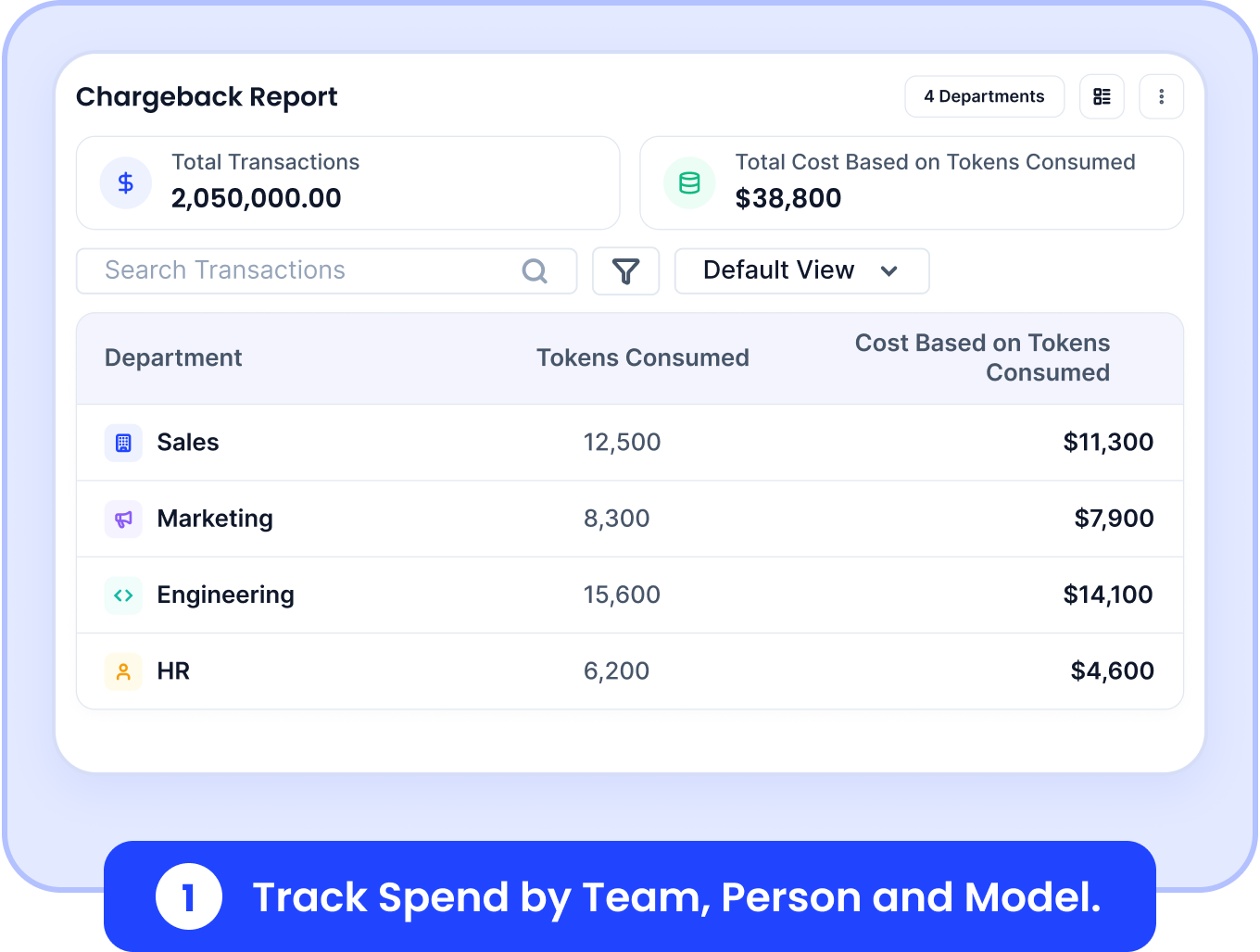
Our AI usage view shows AI usage and spend by person, team and model across every AI tool.
‍

CloudEagle.ai chargeback report showing AI tokens and cost by department

‍

What Apps Are Employees Using That IT Doesn't Know About?

Anything outside your company workspace, because a vendor dashboard only shows accounts inside it. Shadow IT is any app used without IT knowing; shadow AI is the AI version. Common cases:

  • Personal AI Accounts: An employee uses their own ChatGPT account, so company data leaves outside your agreement.
  • Apps on Company Cards: A team buys a tool on a card, and IT never sees it.
  • Apps Outside SSO: Your single sign-on only sees apps connected to it.

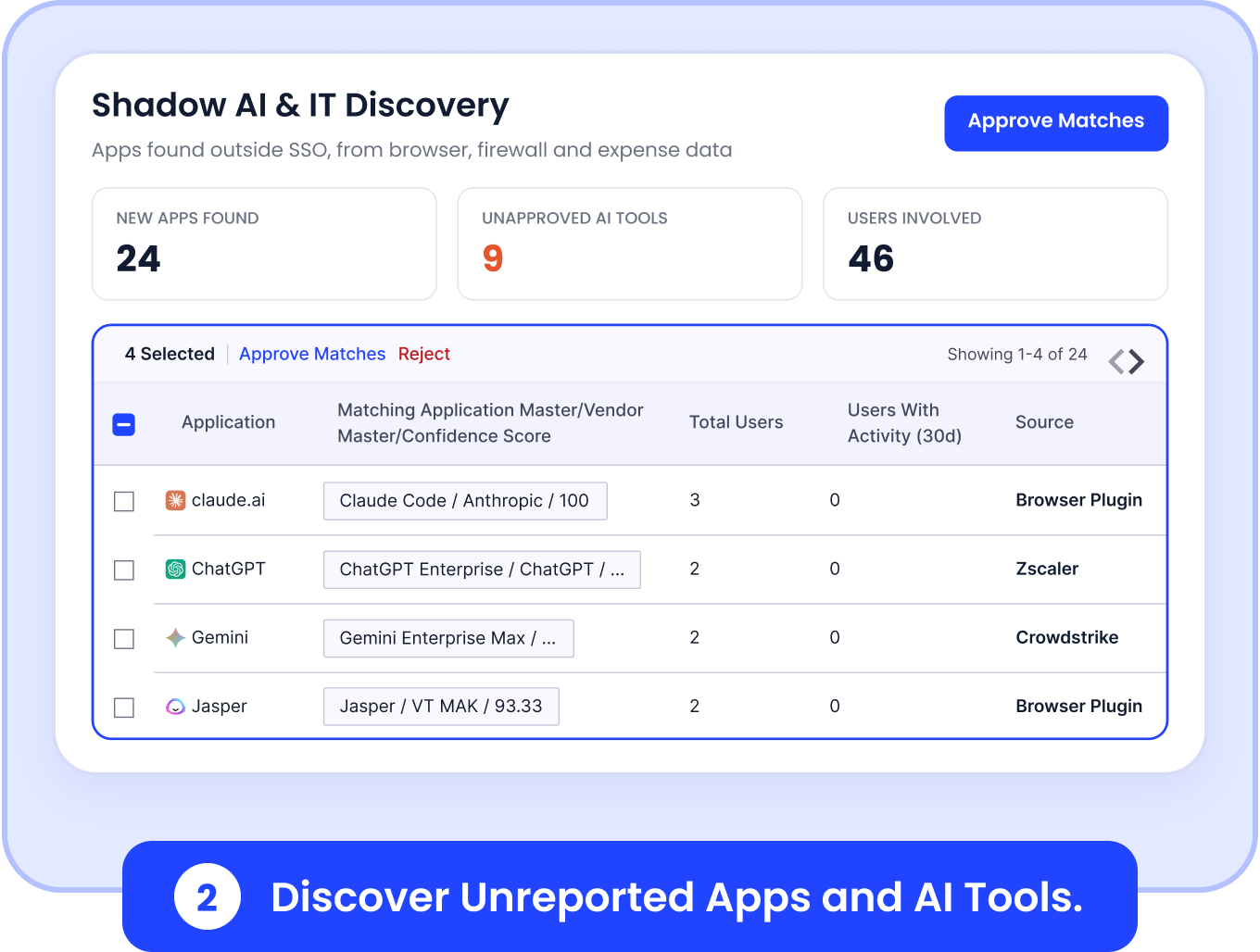
CloudEagle.ai discovers unreported apps and AI tools across seven sources, from your identity provider to card spend, firewall logs and our browser extension, then shows who uses each one. Then approve, block or redirect. More on shadow IT.
‍

CloudEagle.ai shadow AI and IT discovery screen listing unapproved AI tools and their discovery source

‍

What Did We Agree To, and When Do We Need to Act?

A vendor dashboard shows the renewal date for one subscription, not the deal behind it. The cancellation deadline, price caps and discounts live in the signed contract, and reseller purchases may not show a date at all.

Miss the notice deadline and the contract renews for another term.

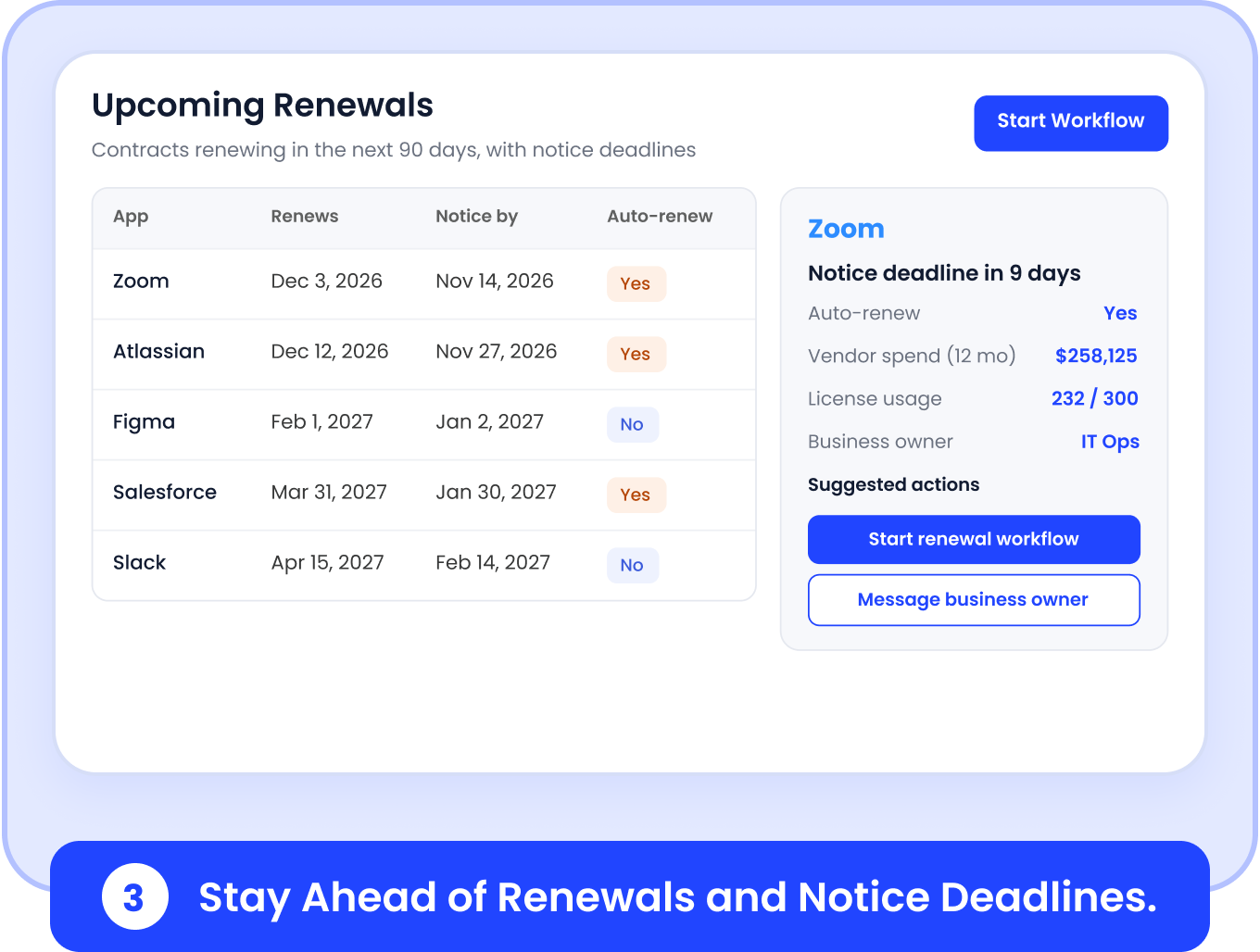
CloudEagle.ai reads your contracts and tracks renewal dates, notice deadlines and pricing in one calendar, next to how much each app is really used.
‍

CloudEagle.ai upcoming renewals table with notice deadlines and a renewal detail card

‍

Who Cleans Up Unused Licenses and Leftover Access?

Usually nobody. A dashboard can show unused licenses in one app, but it doesn't contact users or remove access elsewhere. So waste stays, and people who left can keep access.

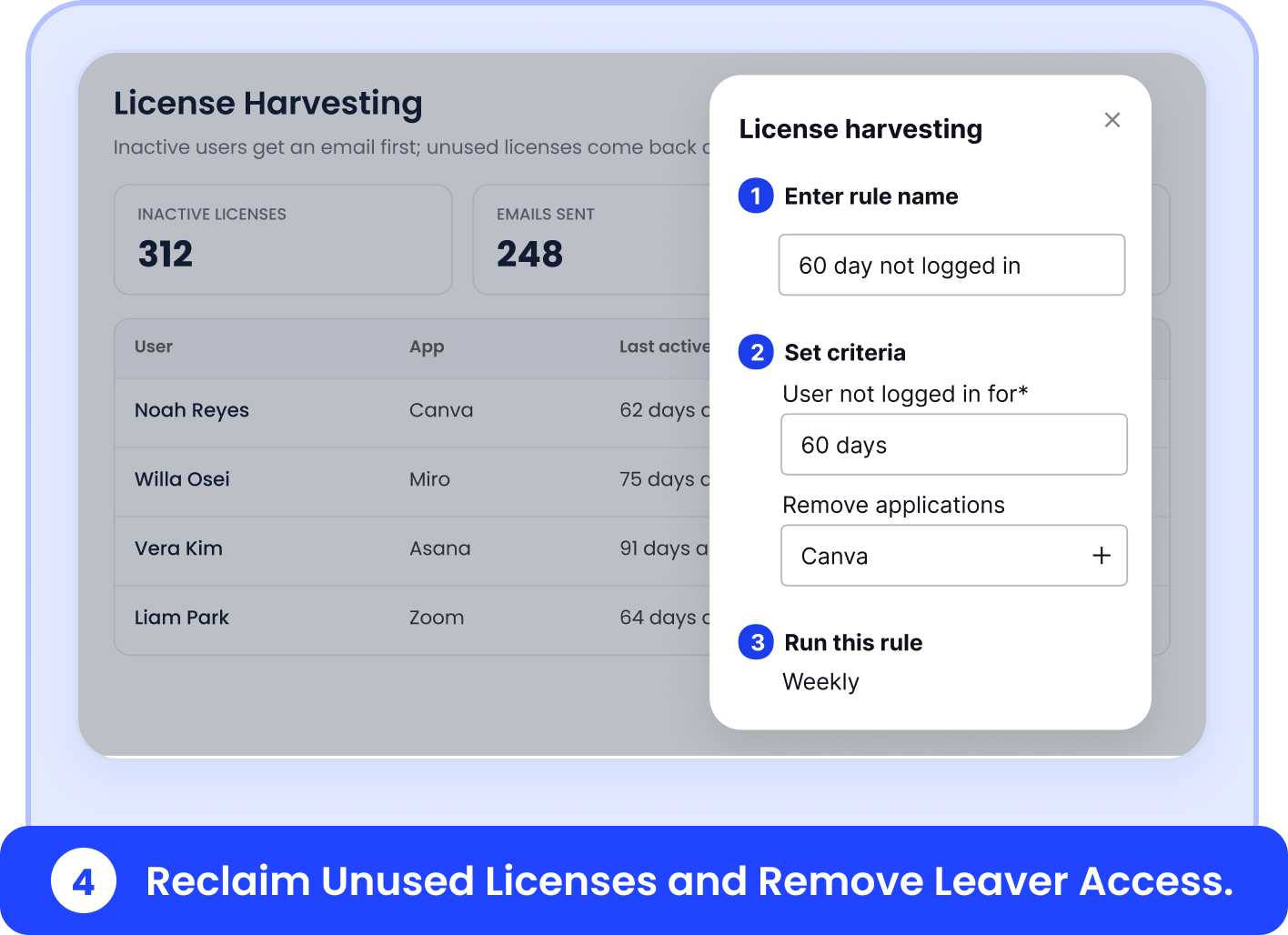
CloudEagle.ai emails idle users, reclaims licenses and removes access when employees leave, as part of our access governance.
‍

CloudEagle.ai license harvesting rule set up over a list of inactive users

‍

Which Systems Does CloudEagle.ai Connect To?

The systems behind your business, so IT doesn't have to visit each vendor dashboard. Discovery finds the app; these systems tell you who owns it, what you pay and what you agreed to.

‍

System What it adds
Identity (Okta, Entra) Who has access
HR (Workday, BambooHR) Who joined or left
Finance (NetSuite) What you pay
Contracts (DocuSign, Coupa) Terms and renewals
App integrations 500+ integrations , plus S3-based data ingestion

‍

"We had no clear view of what each license actually cost or whether people were using what we were paying for. CloudEagle.ai gave us complete visibility across every app, license, and department in one place." - Will Suttle, VP of Finance, Sapphire Ventures. 

‍

When Is a Vendor Dashboard Enough?

For a single vendor with straightforward spend. We read the same vendor APIs, and fill gaps with file uploads. Once you run many apps and AI tools, you need visibility and action across the whole stack.

‍

What Should You Do Next?

List what your dashboards can't answer: total AI spend, unknown apps, contract deadlines and unused licenses. Then connect the systems that hold the answers with our AI governance and SaaS management.

‍

‍

FAQs

Why Isn't a Vendor Dashboard Enough to Govern SaaS and AI?

Each one shows only its own product, in its own units, on the plan you bought. It can't see your other apps, your contract terms or your departments, and it can't act on what it shows.

What Systems Does CloudEagle.ai Connect To?

Identity, HR, finance and contract systems, plus 500+ app integrations. Apps without one send data through S3-based ingestion.

When Is a Vendor Dashboard Enough?

For a single vendor with straightforward spend.

‍

Advertisement for a SaaS Subscription Tracking Template with a call-to-action button to download and a partial graphic of a tablet showing charts.Banner promoting a SaaS Agreement Checklist to streamline SaaS management and avoid budget waste with a call-to-action button labeled Download checklist.Blue banner with text 'The Ultimate Employee Offboarding Checklist!' and a black button labeled 'Download checklist' alongside partial views of checklist documents from cloudeagle.ai.Digital ad for download checklist titled 'The Ultimate Checklist for IT Leaders to Optimize SaaS Operations' by cloudeagle.ai, showing checklist pages.Slack Buyer's Guide offer with text 'Unlock insider insights to get the best deal on Slack!' and a button labeled 'Get Your Copy', accompanied by a preview of the guide featuring Slack's logo.Monday Pricing Guide by cloudeagle.ai offering exclusive pricing secrets to maximize investment with a call-to-action button labeled Get Your Copy and an image of the guide's cover.Blue banner for Canva Pricing Guide by cloudeagle.ai offering a guide to Canva costs, features, and alternatives with a call-to-action button saying Get Your Copy.Blue banner with white text reading 'Little-Known Negotiation Hacks to Get the Best Deal on Slack' and a white button labeled 'Get Your Copy'.Blue banner with text 'Little-Known Negotiation Hacks to Get the Best Deal on Monday.com' and a white button labeled 'Get Your Copy'.Blue banner with text 'Little-Known Negotiation Hacks to Get the Best Deal on Canva' and a white button labeled 'Get Your Copy'.Banner with text 'Slack Buyer's Guide' and a 'Download Now' button next to images of a guide titled 'Slack Buyer’s Guide: Features, Pricing & Best Practices'.Digital cover of Monday Pricing Guide with a button labeled Get Your Copy on a blue background.Canva Pricing Guide cover with a button labeled Get Your Copy on a blue gradient background.

Enter your email to
unlock the report

Oops! Something went wrong while submitting the form.
License Count
Benchmark
Per User/Per Year

Enter your email to
unlock the report

Oops! Something went wrong while submitting the form.
License Count
Benchmark
Per User/Per Year

Enter your email to
unlock the report

Oops! Something went wrong while submitting the form.
Notion Plus
License Count
Benchmark
Per User/Per Year
100-500
$67.20 - $78.72
500-1000
$59.52 - $72.00
1000+
$51.84 - $57.60
Canva Pro
License Count
Benchmark
Per User/Per Year
100-500
$74.33-$88.71
500-1000
$64.74-$80.32
1000+
$55.14-$62.34

Enter your email to
unlock the report

Oops! Something went wrong while submitting the form.

Enter your email to
unlock the report

Oops! Something went wrong while submitting the form.
Zoom Business
License Count
Benchmark
Per User/Per Year
100-500
$216.00 - $264.00
500-1000
$180.00 - $216.00
1000+
$156.00 - $180.00

Enter your email to
unlock the report

Oops! Something went wrong while submitting the form.

Get the Right Security Platform To Secure Your Cloud Infrastructure

Please enter a business email
Thank you!
The 2023 SaaS report has been sent to your email. Check your promotional or spam folder.
Oops! Something went wrong while submitting the form.

Access full report

Please enter a business email
Thank you!
The 2023 SaaS report has been sent to your email. Check your promotional or spam folder.
Oops! Something went wrong while submitting the form.

‍TL;DR

  • Every vendor dashboard is accurate about one product and blind to everything else.
  • AI tools report in different units and screens, so nobody can add up AI spend.
  • Shadow AI and shadow IT never appear in a vendor dashboard.
  • A dashboard shows a renewal date, not the contract terms behind it, and it can't act on what it shows.
  • CloudEagle.ai connects your internal systems and apps in one place, so IT can see usage, cost and renewals, and act on them.

According to Okta's Businesses at Work 2025 report, the average organization now deploys 101 apps, the first time that average has topped 100. That counts only apps connected to Okta, not those outside single sign-on. Each dashboard accurately reports on its own app. But IT and finance need answers across all of them, and a dashboard can't act on what it shows.

‍

What Is Our Total AI Spend, and Who Is Driving It?

A vendor dashboard can't tell you, because each AI tool, whether ChatGPT, Claude, Copilot or Cursor, reports only on itself, in its own unit. Finance gets the bills but can't tell who spent what, or which department it belongs to.

  • Different Units: Seats, tokens and credits (GitHub Copilot since June 2026) can't be added up.
  • More Than One Console: Claude paid plans and the Claude Console for API usage are separate products, with separate billing.
  • Plan Limits: Per-user data often comes only with Enterprise plans. Claude's Analytics API is Enterprise-only, and Team plans get a spend file you download by hand.

So someone copies numbers into a spreadsheet. It doesn't update on its own, and the first sign of overspending is the invoice.

Our AI usage view shows AI usage and spend by person, team and model across every AI tool.

‍

CloudEagle.ai chargeback report showing AI tokens and cost by department

‍

What Apps Are Employees Using That IT Doesn't Know About?

Anything outside your company workspace, because a vendor dashboard only shows accounts inside it. Shadow IT is any app used without IT knowing; shadow AI is the AI version. Common cases:

  • Personal AI Accounts: An employee uses their own ChatGPT account, so company data leaves outside your agreement.
  • Apps on Company Cards: A team buys a tool on a card, and IT never sees it.
  • Apps Outside SSO: Your single sign-on only sees apps connected to it.

CloudEagle.ai discovers unreported apps and AI tools across seven sources, from your identity provider to card spend, firewall logs and our browser extension, then shows who uses each one. Then approve, block or redirect. More on shadow IT.

‍

CloudEagle.ai shadow AI and IT discovery screen listing unapproved AI tools and their discovery source

‍

What Did We Agree To, and When Do We Need to Act?

A vendor dashboard shows the renewal date for one subscription, not the deal behind it. The cancellation deadline, price caps and discounts live in the signed contract, and reseller purchases may not show a date at all.

Miss the notice deadline and the contract renews for another term.

CloudEagle.ai reads your contracts and tracks renewal dates, notice deadlines and pricing in one calendar, next to how much each app is really used.

‍

CloudEagle.ai upcoming renewals table with notice deadlines and a renewal detail card

‍

Who Cleans Up Unused Licenses and Leftover Access?

Usually nobody. A dashboard can show unused licenses in one app, but it doesn't contact users or remove access elsewhere. So waste stays, and people who left can keep access.

CloudEagle.ai emails idle users, reclaims licenses and removes access when employees leave, as part of our access governance.

‍

CloudEagle.ai license harvesting rule set up over a list of inactive users

‍

Which Systems Does CloudEagle.ai Connect To?

The systems behind your business, so IT doesn't have to visit each vendor dashboard. Discovery finds the app; these systems tell you who owns it, what you pay and what you agreed to.

‍

System What it adds
Identity (Okta, Entra) Who has access
HR (Workday, BambooHR) Who joined or left
Finance (NetSuite) What you pay
Contracts (DocuSign, Coupa) Terms and renewals
App integrations 500+ integrations , plus S3-based data ingestion

‍

"We had no clear view of what each license actually cost or whether people were using what we were paying for. CloudEagle.ai gave us complete visibility across every app, license, and department in one place." - Will Suttle, VP of Finance, Sapphire Ventures. 

‍

When Is a Vendor Dashboard Enough?

For a single vendor with straightforward spend. We read the same vendor APIs, and fill gaps with file uploads. Once you run many apps and AI tools, you need visibility and action across the whole stack.

‍

What Should You Do Next?

List what your dashboards can't answer: total AI spend, unknown apps, contract deadlines and unused licenses. Then connect the systems that hold the answers with our AI governance and SaaS management.

‍

‍

FAQs

Why Isn't a Vendor Dashboard Enough to Govern SaaS and AI?

Each one shows only its own product, in its own units, on the plan you bought. It can't see your other apps, your contract terms or your departments, and it can't act on what it shows.

What Systems Does CloudEagle.ai Connect To?

Identity, HR, finance and contract systems, plus 500+ app integrations. Apps without one send data through S3-based ingestion.

When Is a Vendor Dashboard Enough?

For a single vendor with straightforward spend.

‍

CloudEagle.ai recognized in the 2025 Gartner® Magic Quadrant™ for SaaS Management Platforms
Download now
gartner chart
5x
Faster employee
onboarding
80%
Reduction in time for
user access reviews
30k
Workflows
automated
$15Bn
Analyzed in
contract spend
$2Bn
Saved in
SaaS spend

Streamline SaaS governance and save 10-30%

Book a Demo with Expert
CTA image